
Download anWriter HTML editor APK – HTML editor, web development, mobile coding, code editor, web viewer, FTP access, syntax highlighting, autocompletion, lightweight app, programming languages, mobile website builder
Overview
anWriter HTML editor is a mobile-based code editing application designed for web developers who need to write, edit, and preview HTML, CSS, and JavaScript code directly from their Android devices. Developed by Ansmsoft, the app serves as a lightweight tool for both beginners and experienced developers seeking to code on the go. It enables users to build and maintain websites without relying on a desktop environment, making it ideal for quick edits, on-the-spot debugging, or learning web development fundamentals.
The app supports modern web standards, including HTML5, CSS3, jQuery, Bootstrap, and Angular, allowing developers to work with current frameworks and libraries. Its integrated web viewer provides real-time previews, helping users visualize changes immediately. This functionality is especially useful for testing responsive layouts or debugging rendering issues.
The app also includes support for multiple programming languages such as C/C++, Java, SQL, Python, and LaTeX, enhancing its versatility beyond front-end development. While the developer did not provide additional system requirements, the app is designed to be fast and resource-efficient, minimizing impact on device performance. It is particularly suited for users who value portability and immediate access to their coding projects.
Key Features & Capabilities
- Integrated Web Viewer: Allows real-time preview of HTML and CSS code, enabling developers to see visual changes instantly without external tools.
- Syntax Highlighting: Supports syntax highlighting for C/C++, Java, SQL, Python, and LaTeX, improving code readability and reducing errors.
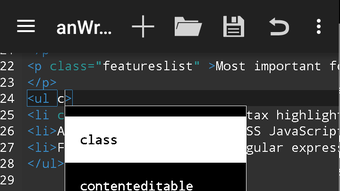
- Autocompletion: Offers intelligent autocompletion for HTML, CSS, JavaScript, LaTeX, C, and Python, accelerating coding speed and reducing typos.
- Multi-Language Support: Compatible with a wide range of programming and scripting languages, including HTML5, CSS3, jQuery, Bootstrap, and Angular.
- FTP Access: Enables direct file transfer to and from remote servers, facilitating quick deployment and updates to live websites.
- Lightweight Design: Built to consume minimal system resources, ensuring smooth performance even on lower-end Android devices.
These features collectively support a streamlined workflow for mobile web development. For example, a developer can write a responsive layout in HTML and CSS, preview it using the built-in viewer, and immediately test the result. If adjustments are needed, they can use autocompletion to insert correct tags or properties faster.
The FTP functionality allows users to upload updated files directly from their mobile device, making it a viable tool for remote site maintenance. Similarly, students learning web development can use the app to practice coding in various languages with immediate feedback. The app’s lightweight nature ensures it remains accessible even on devices with limited storage or processing power.
While performance details were not specified, the app’s design philosophy emphasizes efficiency and usability.
User Interface, Workflow & Performance
The user interface of anWriter HTML editor is structured around a clean, minimal layout that prioritizes code input and preview functionality. Navigation is straightforward, with a central code editor flanked by preview and file management panels. The interface supports basic file operations such as opening, saving, and creating new documents.
Users can switch between different file types using a tab-based system, although the exact workflow efficiency is not detailed. The app’s performance is described as fast and lightweight, suggesting it operates smoothly under normal usage conditions. However, exact performance metrics such as CPU or RAM usage were not provided.
The developer did not specify resource usage details, so general observations are based on typical behavior of lightweight mobile apps. Stability appears to be consistent, though users have reported occasional delays with the keyboard cursor, which may affect typing fluidity. Copy and paste functions are reportedly not fully functional, which could hinder productivity during complex edits.
Despite these limitations, the app maintains a responsive feel during routine tasks. The internal viewer updates in near real-time, contributing to a seamless preview experience. Overall, the workflow is optimized for quick edits and on-the-go development, though it may not be ideal for extended coding sessions.
Compatibility & System Requirements
anWriter HTML editor is designed for Android devices and is compatible with the Android operating system. The current version is 2.1.2, with a file size of 4.3 MB, indicating a compact installation footprint. This small size contributes to its lightweight nature, making it suitable for devices with limited storage.
The developer did not provide detailed system requirements, so specific hardware specifications such as RAM, processor, or minimum Android version are unknown. Compatibility information was partially provided, with no mention of device types, screen resolutions, or supported Android versions beyond the OS name. It is recommended to use the app on devices running a recent Android version to ensure optimal functionality.
The app does not require a constant internet connection for core features, though FTP access will require network connectivity. Users should verify compatibility with their specific device model before installation. The app is free to download and use, with no in-app purchases or subscription models disclosed.
Pros and Cons
Pros
- Lightweight and fast, ideal for low-resource devices
- Supports multiple programming languages and modern web frameworks
- Integrated web viewer for real-time previews
- Autocompletion improves coding speed and accuracy
- FTP access enables direct file transfers to remote servers
- Free to download and use with no hidden costs
Cons
- Keyboard cursor movement can be slow or unresponsive
- Copy and paste functions are not fully supported
- Intrusive ads may disrupt the coding experience
- Limited system requirements information provided
- Not optimized for extended coding sessions
FAQ Section
Is anWriter HTML editor compatible with all Android devices?
The app is designed for Android, but specific compatibility details such as minimum Android version or device requirements were not provided by the developer.
Is the app safe to download and use?
anWriter HTML editor is available as a free APK, and while the developer is Ansmsoft, users should ensure they download from trusted sources to avoid potential security risks.
Does the app require an internet connection?
Core coding features can be used offline. However, FTP access and web preview functionality may require an active internet connection.
Are there any in-app purchases or subscription fees?
The app is listed as free with no mention of in-app purchases or subscription models in the provided information.
Can I use anWriter HTML editor for professional web development?
While the app supports modern web technologies and offers useful tools like FTP access and real-time previews, its limitations in keyboard responsiveness and copy/paste functionality may affect its suitability for large-scale or professional projects.
Final Thoughts + CTA
anWriter HTML editor presents a compelling option for developers seeking a mobile-first approach to web development. Its lightweight design, multi-language support, and integrated web viewer make it a practical tool for quick edits, learning, and remote maintenance. The inclusion of FTP access adds significant value for users who need to deploy changes on the go.
However, persistent issues with the keyboard cursor, lack of reliable copy/paste functions, and intrusive ads may hinder productivity for more intensive workflows. Despite these drawbacks, the app delivers solid functionality for its intended purpose and remains a strong contender in the mobile code editor space. For students, hobbyists, and developers who value portability and simplicity, anWriter HTML editor is a reliable choice.
Download anWriter HTML editor now to start coding from anywhere.





.png)

